

VVK Digital Marketing

Is Your Google My Business Suspended?

CONTACT US

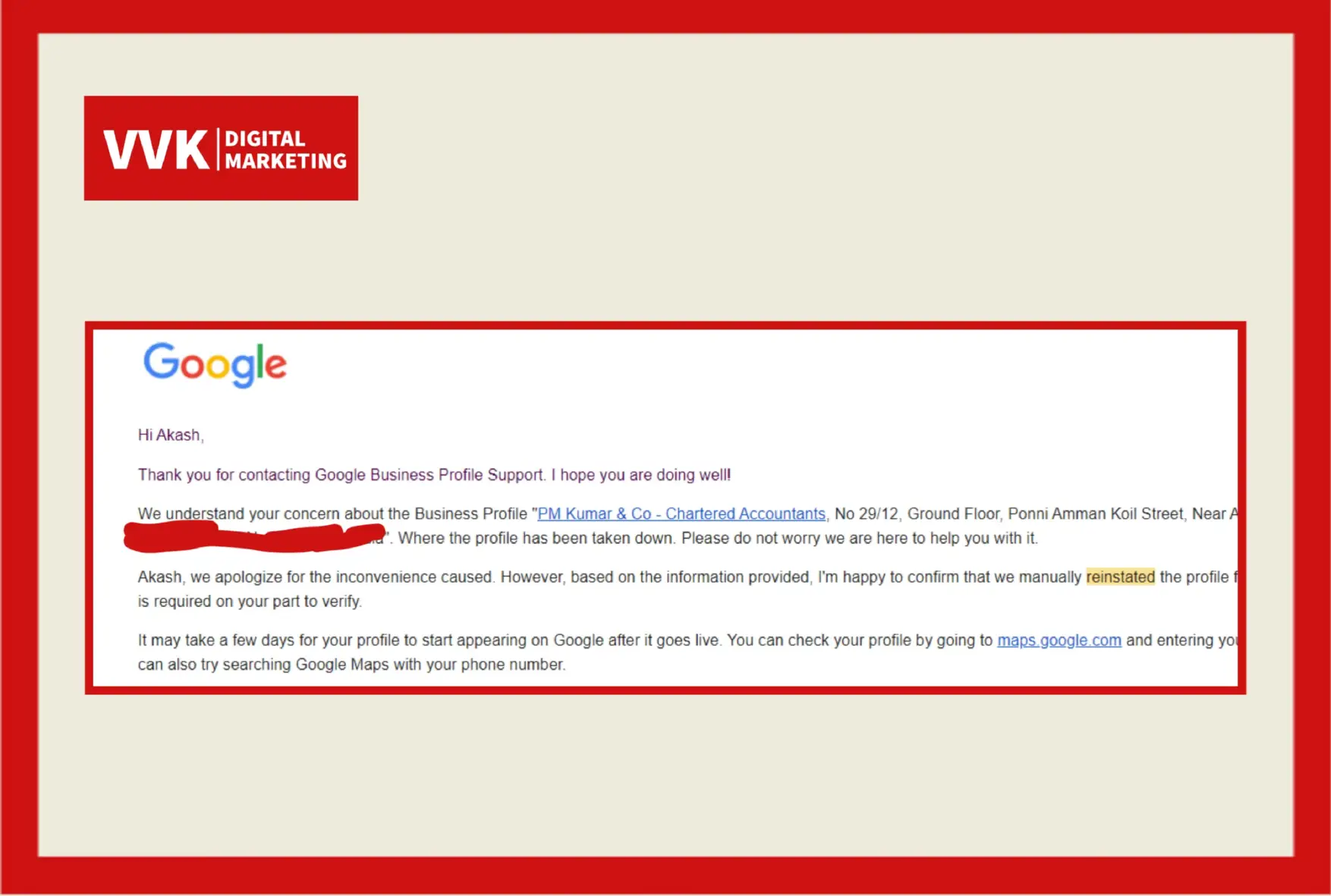
Want to Reinstate Your Suspended GMB Account?

If Yes, First know which suspension it is, There are 2 suspensions in Google My Business where the business profile is partially suspended and visible on Google Search and Google Maps, It’s Called Soft Suspension and When your business profile is not showing on Google Search and Maps When it is Suspended, Then it is called hard suspension. You can solve the Google Business Profile Suspension by Appealing to Google. If you dont want to make your listing in getting trouble by trial and error methods in reinstating it, Then simply give a call to us. We can assit you further.

Opening Days

Monday to Saturday : Open

Sunday : Closed

Opening - Closing Time

Monday to Friday : 9 Am to 7 Pm

Saturday : 9 Am to 8 Pm

Trusted Digital Marketing Agency Since 5+ years

Helped over 4000+ Customers to achieve their Business Goals.

Know About Google My Business Suspension

There are many reasons why Google My Business Listings Get Suspended. The Common issues is doing editing in the listing details and misinformation of your business on web, multiple listings for the same business or competitor, user reported listing. Violating Google My Business Guidelines and Policies is Also a Major Reason.

Google typically sends an email explaining the suspension. If the reasons are unclear, our team can help you diagnose the cause by examining your GMB profile for compliance with Google’s guidelines.

Yes, most suspended GMB listings can be reinstated after the issues causing the suspension are resolved and a reinstatement request is submitted to Google.

The reinstatement process varies in time. It can take anywhere from a few days to several weeks, depending on the complexity of the issue and Google’s response times.

First, review Google’s guidelines to ensure your business complies. Next, correct any discrepancies in your business information across the web. Finally, gather evidence and documents that prove your business’s legitimacy and prepare for the reinstatement request.

It’s not recommended to create a new listing without addressing the issues of the suspended one, as this can lead to further complications. It’s best to resolve the suspension of the original listing.

Keep your business information accurate and up-to-date, adhere to Google My Business guidelines, and regularly check your GMB dashboard for notifications or suggested modifications.

Why Choose Us?

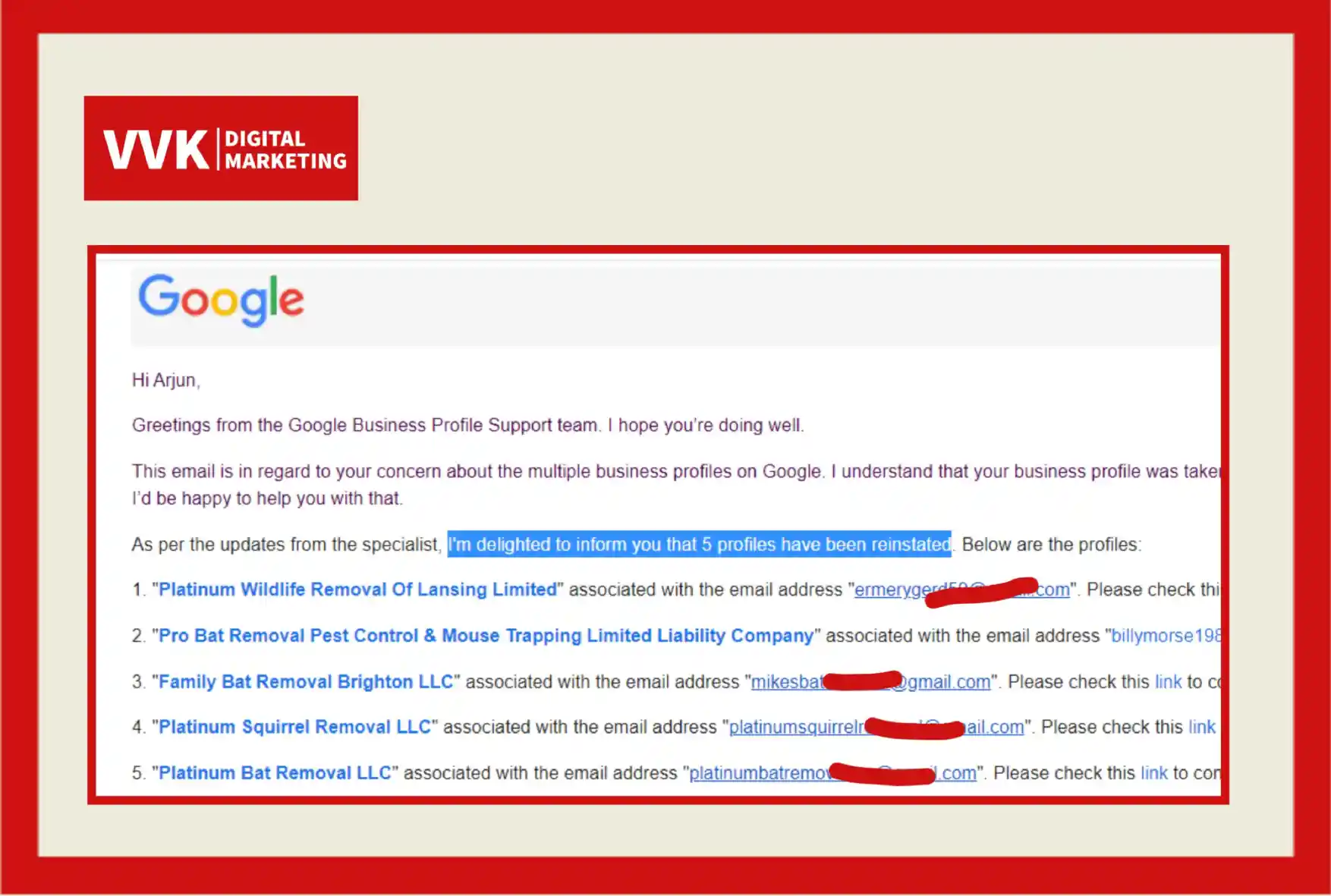
We are VVK Digital Marketing. The best team to address all Google My Business Problems. We had 3 step process to solve your google my business account. We analyze your business profile and find’s the exact problem and solve’s it to get it reinstated. Our team had 5+ years experience in solving GMB Profiles.

We regularly have conversations with Google Business Profile support and had 99% sucess rate in reinstating google business profiles. We also provide Google My Business Verifications, Mobile Number Updation, Duplicate Removal, and More Complex Issues.

Few Reasons For GMB Suspension

Our Service Fee

Invest a Little, Profit a Lot!

GMB Reinstatement -

Solution less than 7 days Approximately

Reviews

"My Google Business Profile was suspended and we tried reinstalling ourselves but couldn't get it approved. We contacted Mr. Vinay Kumar to help us fix this issue; they are very responsive and helped us with the request right away; they reviewed our GMB and made changes to comply with Google guidelines and also submitted our business documents to get us reinstated in less than 2 days. This team is definitely your best option if you are looking for help with Google business profile suspensions reinstatement. Our business is back on the top of search rankings now again and very are happy with their work."

Immigration Consultant

"Unfortunately our GMB profile was suspended and we couldn’t figure out why. I wasn’t sure who to turn to and looked up a few places. When I called Vinay asked me to submit a form and literally within minutes I was connected with their technical guy Manoj who was on it. Quickly he gathered the documentation he needed from me quickly and told me he would be in touch within a couple of days. He also explained that since he does this so often for other customers he can expedite and has a streamline to google support. Sure enough I woke up this morning and our profile was up and running. Thanks Vinay and Manoj!"

Preenu Ashok

Physiotherapist

"My GMB was suspended after a routine address change. I had tried for weeks on my own to make any progress and ultimately got stuck in an endless Google email loop. It was a dead end. I researched, nervously and anxiously for someone who could help, but that I also felt I could trust handing over the keys over to. Everyone and Mr. Vinay Local was helpful and professional. Venky was so kind and efficient on the phone and e-mail. He had my listing back up in a matter of days. I’ve been in business nearly 16 years and losing my Google Business listing was one of the most stressful processes; Mr. Vinay local absolutely took that stress away. I’m so grateful!"

Purna

Natural Salons

Frequently Asked Questions

There are several reasons why GMB listings get suspended. Common causes include a mismatch of your business information on the web, multiple listings for the same business, or user-reported discrepancies. Violation of Google’s guidelines is also a major reason for suspensions.

Google typically sends an email explaining the suspension. If the reasons are unclear, our team can help you diagnose the cause by examining your GMB profile for compliance with Google’s guidelines.

Yes, most suspended GMB listings can be reinstated after the issues causing the suspension are resolved and a reinstatement request is submitted to Google.

  • The reinstatement process varies in time. It can take anywhere from a few days to several weeks, depending on the complexity of the issue and Google’s response times.

  • First, review Google’s guidelines to ensure your business complies. Next, correct any discrepancies in your business information across the web. Finally, gather evidence and documents that prove your business’s legitimacy and prepare for the reinstatement request.

It’s not recommended to create a new listing without addressing the issues of the suspended one, as this can lead to further complications. It’s best to resolve the suspension of the original listing.

Keep your business information accurate and up-to-date, adhere to Google My Business guidelines, and regularly check your GMB dashboard for notifications or suggested modifications.

While it’s possible to handle reinstatement on your own, professional assistance can make the process smoother and improve your chances of success. Experts, like our team, are familiar with Google’s processes and can provide valuable support.

In most cases, your reviews and ratings should be reinstated along with your listing after a suspension is resolved. However, during the suspension period, they may not be visible to users.

A reinstatement request can be submitted through the Google My Business help page. You’ll need to fill out a form providing details about your business and the issues you’ve addressed.

There’s no official way to expedite the process. However, providing clear and complete information in your reinstatement request can prevent delays.

Common issues include having an incorrect or ineligible address, misleading information, multiple listings for the same location, or spammy behavior like keyword stuffing in the business name.

Ensure that each location adheres strictly to Google’s guidelines, with accurate and unique information provided for each listing. Regularly audit your listings for consistency and guideline adherence.

Avoid creating duplicate listings, using a P.O. box or virtual office as your address, or making multiple reinstatement requests in a short period. Also, don’t make significant changes to your listing before understanding the cause of the suspension.

Yes, a GMB suspension does not affect your ability to use other Google services like Google Ads, Google Analytics, or your Google account.

Suspensions can be permanent if Google determines that the business has egregiously violated their policies. However, most suspensions are temporary and can be resolved by addressing the issues identified by Google.

Service-area businesses are not necessarily more prone to suspensions, but they must adhere to specific guidelines set by Google, such as not listing a residential address or P.O. box unless it’s a storefront.

While you work on reinstating your GMB listing, focus on other areas of local SEO such as maintaining an up-to-date website, being present on other local directories, and engaging with customers on social media.

Do provide clear and concise information. Do be patient and respectful. Don’t spam the support team with multiple messages. Don’t provide false or misleading information.

Regularly review Google’s quality guidelines, keep your business information accurate and consistent across the web, and avoid prohibited content or practices.

A soft suspension typically means your listing is no longer visible on Google Maps but still exists in your GMB account. A hard suspension means the listing has been removed from both Google Maps and your GMB account.

When updating your address, ensure all details are consistent with your actual, current business location. Verify your new location as prompted by GMB without creating a new listing for the same business.

Using third-party services is generally safe, but ensure they follow Google’s guidelines. Suspensions can occur if these services employ non-compliant tactics or mismanage your information.

Watch for red flags like discrepancies in your business information, receiving warnings from Google, or noticing spammy behavior (such as unexpected changes to your listing details).

We provide a comprehensive analysis of your GMB listing, offer assistance in gathering the right documentation for your reinstatement request, and use our experience to guide you through the resolution process, increasing the likelihood of a favorable outcome.

Specialized in Google My Business Reinstatement Services

Excellence in Google My Business Services

We are VVK Digital Marketing. The best team to address all Google My Business Problems. We had 3 step process to solve your google my business account. We analyze your business profile and find’s the exact problem and solve’s it to get it reinstated. Our team had 5+ years experience in solving GMB Profiles.

Business Hours

Sunday, 9 AM– 8PM
Monday, 9 AM– 8 PM
Tuesday, 9 AM– 8 PM
Wednesday, 9 AM– 8 PM
Thursday, 9 AM– 8 PM
Friday, 9 AM– 8PM
Saturday, 9 AM–8 PM

Contact Us

Mobile : 9505 9606 99
Address : Ofc.No: 3-6-365, 5th Floor, Liberty Plaza Himayat Nagar, Hyderabad Telangana 500029, India.

Get Your Suspended Google My Business Reinstated:

We are VVK Digital Marketing. The best team to address all Google My Business Problems. We had 3 step process to solve your google my business account. We analyze your business profile and find’s the exact problem and solve’s it to get it reinstated. Our team had 5+ years experience in solving GMB Profiles.

Google My Business Suspended

Google Business Profile Suspended? Here’s How To Get Reinstated

Don’t let your suspended Google Business Profile listing cause worry for your business. Find out why and how to get it reinstated.

For most small businesses, Google Business Profile (GBP) is their marketing lifeblood.

Because it’s free, many local businesses rely solely on their Google Business Profile to generate traffic and calls, as well as to bring customers to their business.

Marketers know it’s risky to put all your marketing eggs in one basket.

But for a local business that has a limited budget – or no marketing budget at all – a free GBP listing is often all they have to promote their business online.

When a business’s GBP listing gets suspended, it can literally make a company’s sales come to a screeching halt. And in some cases, I’ve seen companies go out of business due to a suspension.

A suspended GBP listing will cause the business owner a lot of stress and worry – especially when most aren’t sure why they were suspended in the first place

What Is A Google Business Profile Suspension?

A Google Business Profile suspension is when your GBP listing is no longer visible on Google and Google Maps, or you have lost control of your listing (your business listing is essentially “unverified,” and you can’t manage it.)

You will know that your listing has been suspended when you see one of these notifications in you GBP dashboard:
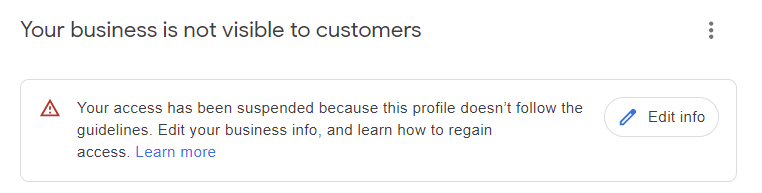
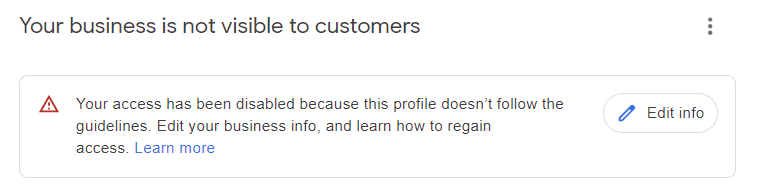
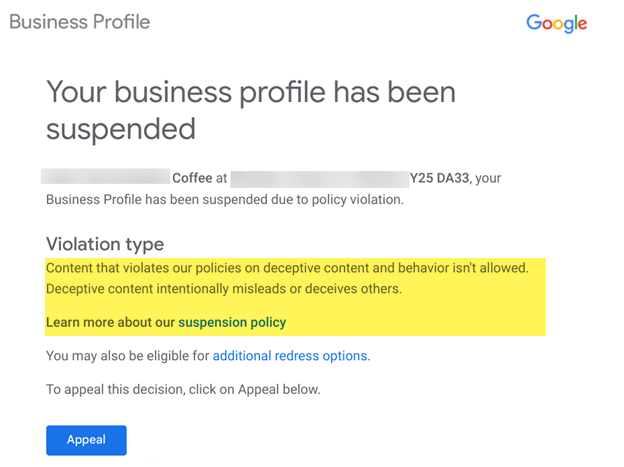
You will also get an email from Google letting you know that your GBP listing has been suspended.
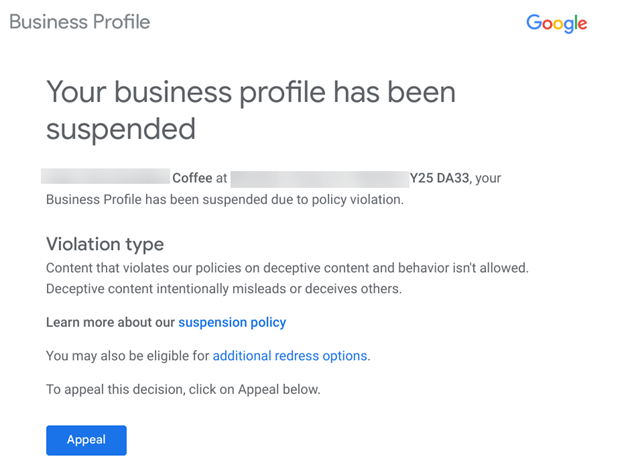
When your listing gets suspended, in the email you receive, Google will give you the “violation type.” This will give you a general idea of the reason your listing got suspended.

GBP listings can get suspended for various reasons – many of which have to do with spammy tactics or if the GBP listing owner breaks Google Business Profile Guidelines.

Google can also give you a Manual Suspension if it reviews your listing and finds an issue with it.

This review often comes after someone reports your listing through GBP’s Redressal Form.

It’s also possible for a user to report a listing on Google Maps or search through the Suggest an edit feature.

If that person is “trusted” enough by Google, it is possible that their suggestion to remove the business listing or make negative edits could take effect almost immediately. Sometimes, these changes can cause a suspension.

Suspensions can also happen after you make changes to your listing.

For instance, one of my client’s listings was immediately suspended after he correctly changed his landscaping business from a storefront with a physical address (his home) to a service area business by deleting the address.

Immediately after he deleted the address from the listing, his GBP profile was suspended.

There are two types of suspensions:

  • A hard suspension.
  • A soft suspension.

What Is A Hard Suspension?

A hard suspension is when you do a search for your company’s name and city, and your Knowledge Panel/Business Profile doesn’t show up online – which is a very bad thing because potential customers won’t be able to find your GBP listing on Google Maps or search results.Hard suspensions usually happen when Google determines that your business doesn’t qualify for a GBP listing or you’re using spammy tactics.

What Is A Soft Suspension?

A soft suspension is when your business’s Knowledge Panel/Business Profile still shows up online, and you can access it in your GBP dashboard, but it looks as if it hasn’t been verified and you can’t manage or update your listing.

If you have a soft suspension, your GBP profile can be subjected to user-suggested edits more easily – making it more vulnerable to incorrect changes and displaying incorrect information.

Also, some industries are more likely to get suspensions than others.

These categories are known to have more spam and fake listings, which makes them more prone to suspensions.

Google and SEO professionals have been trying to crack down on spammy and fake GBP listings, so if you’re in one of these industries, someone may report your profile if you are violating any Google Business Profile rules.

These spammy categories are typically Service Area Businesses (SABs) and include:

  • Locksmiths.
  • Lawyers.
  • Plumbers.
  • Pest control services.
  • HVAC.
  • Etc.

Why Would Your Google Business Profile Get Suspended?

If your GBP listing gets suspended, you have likely done something that looks suspicious or spammy, you broke Google Business Profile guidelines, or you violated the terms of service of another Google product or service.

Google suspends listings for various reasons – especially if you are violating Google Business Profile Guidelines.

How Do You Know If Your GBP Profile Has Been Suspended?

Most business owners first notice a decrease in calls or visitors to their business.

They will then do a quick search online and may not find their listing at all, or they will log in to their Google Business Profile dashboard and see a notification that alerts them that their listing has been suspended:
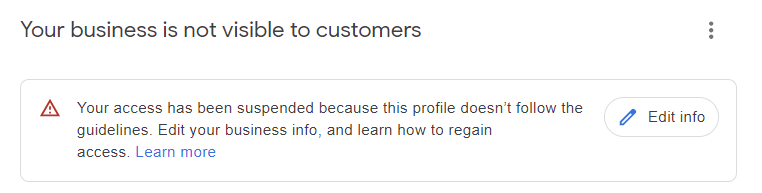
And they will receive an email letting them know that their listing was suspended, too.

This email contains valuable information about the “violation type” – or the general policy your listing violates.
Common Reasons Why A GBP Listing Gets Suspended

There are many common reasons why a Google Business Profile may get suspended. For instance, if you are in a high-spam industry like lawyers, locksmiths, or plumbers, you might get your listing suspended just because of the industry you’re in.

If you sat down at your computer and made several updates to the main information on your Google Business Profile listing in one sitting, that also can sometimes cause Google to be suspicious and trigger a suspension.

Here are some other reasons why GBP listings get suspended:

  • Keyword stuffing your business name.
  • Using a P.O. Box or UPS store address.
  • You set up your listing at a virtual office or co-working space address.
  • You have a Service Area Business (SAB) and are displaying a physical address.
  • You have an online-only business.
  • You are in a high-risk business category, like lawyers, plumbers, HVAC, locksmiths, rehab centers, etc.
  • If another business shares your same address – especially if it’s a residential address.
  • You have made a bunch of changes/edits to your GBP profile in one sitting.
  • The URL you add to your GBP profile forwards/redirects to another website or links to a social media page.
  • If you change your listing from a Storefront to a SAB – or vice versa.
  • Having multiple GBPs in an area that has service areas overlapping.
  • Your address or hours don’t match what is listed on your website or other online business directories/citations.
  • You list your business hours as 24/7.
  • A manager on your listing had their account suspended – so your listing was also suspended.
  • You created multiple listings for the same business at the same address.
  • You violated the terms of service of some other Google tool or service.

Seeing that suspension notice and email will probably cause you to panic – and you may be tempted to fill out the appeal form right away.

But wait!

Before you can apply for an appeal, you have to fix what’s wrong with your listing.

If you’ve done any of these things, you will need to fix the issues before you submit your appeal and try to get your GBP reinstated.

Now, many people who get their listings suspended think they should just create a new listing to avoid fixing the suspended profile.

Do not create a new listing!

Doing that will just complicate things and is a direct violation of Google’s guidelines. (Plus, chances are very high that if you do create a new GBP listing, that profile will immediately be suspended, too.)

When it comes to fixing what caused the suspension, you should first carefully read about the violation type identified in the email you received and next review the Google Business Profile Guidelines to make sure you didn’t violate any of those rules.

For instance, if you have keyword-stuffed your business name, you need to fix your company’s name to get your listing reinstated.
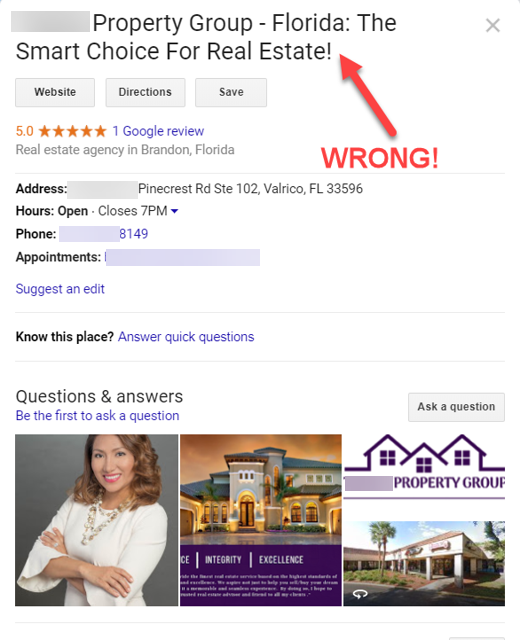
In the example above, the real estate agent added extra, spammy words to the name of her business.

Before she submits her reinstatement form, she needs to delete the words “- Florida: The Smart Choice For Real Estate!” from her business name.

If you think you were suspended because you have your hours listed as 24/7, then you should adjust your hours to be something like 8:00 a.m. – 6:00 p.m. before you submit your appeal.

(Note: The hours you list on your GBP profile should be the hours that you have employees at your business location to meet with customers.

If you’re a SAB, it should be the hours that you are actually available to serve your customers at their location. Not when you answer your phone. Google wants to know when you have employees at your business to physically help customers.)

Do you have a duplicate listing problem, or have you set up more than one business at the same address?

You would need to fix these issues before you try to get your listing reinstated.
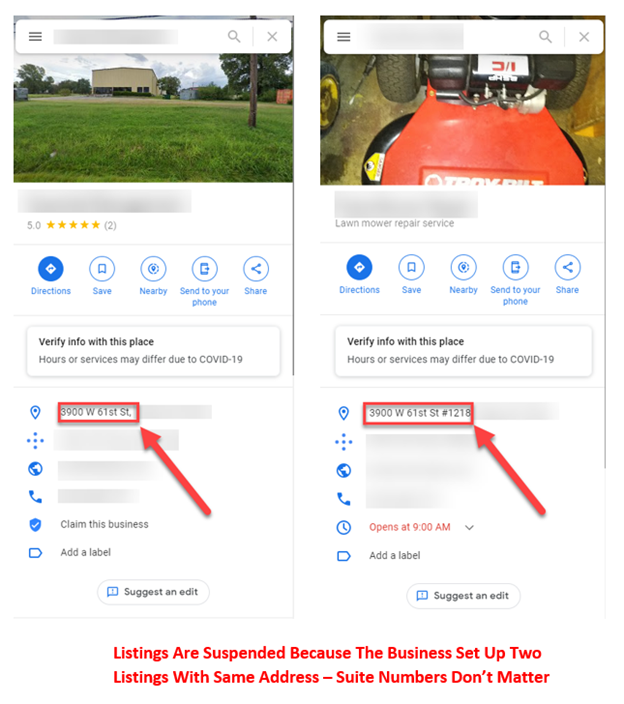
Once you think you’ve figured out the issues and have fixed your GBP, it’s time to fill out the appeal form.

The Appeal Tool Process

Once you’ve fixed the problems with your listing, it’s time to use the Appeals tool.

The Google Business Appeal process is pretty straightforward, but you must be prepared ahead of time. That’s why reading through this article in its entirety is important.

First, be sure to look at the Help document about the appeal process and become familiar with it. Next, let’s look at how the appeal process works.

When your GBP listing gets suspended, you will receive an email that looks like the one below. This email contains a blue button that says Appeal. You will need to click on the Appeal button that takes you to the Appeals tool.
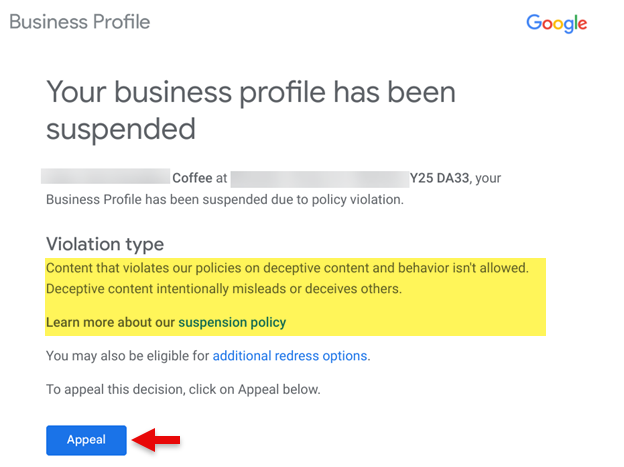
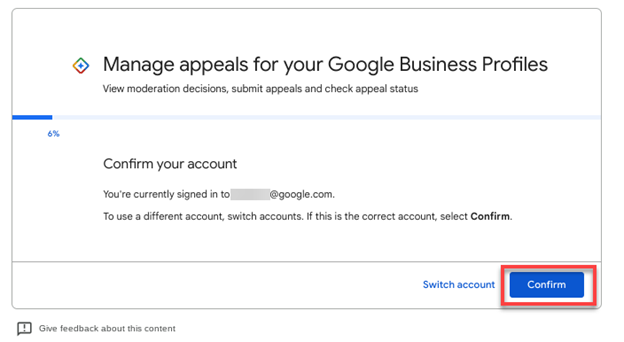
The Appeals tool will be your central headquarters for working on your appeal and checking the status of your appeal.

Before you begin, double-check to make sure you’re logged in using the email address that you use to manage the suspended GBP listing account, and then click Confirm.
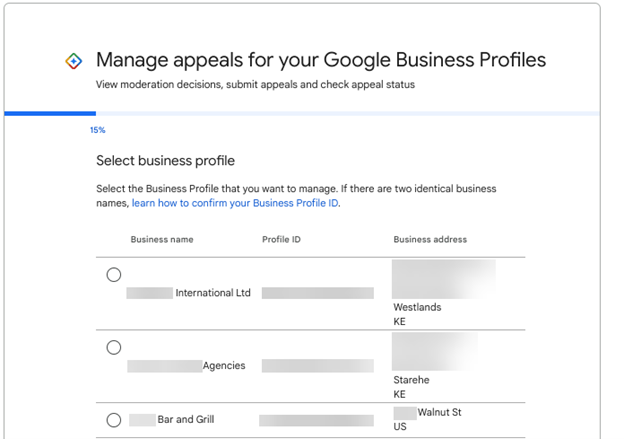
Next, select the business profile that’s suspended. If you only have one business location, only the suspended location will appear here.
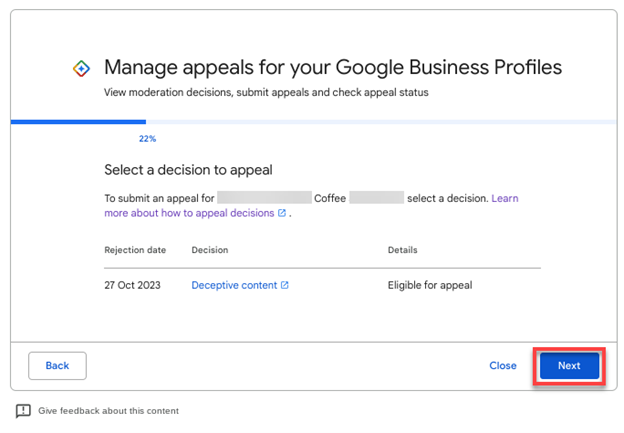
On the next screen, you will see when the Business Profile was suspended, the reason for the suspension, and the details/status:

  • Cannot be appealed.
  • Eligible for appeal.

Note that not all suspensions are eligible to be appealed.

If you see that your Google Business Profile can’t be appealed – you’re out of luck. You cannot create a new GBP; you are simply done with Google Business Profiles.

If the Details/Status says Eligible for Appeal, click Next to move forward through the appeal process.
Pro Tip: This next section is very important. Once you click the Submit button on this next screen, you have exactly 60 minutes to upload official documents to prove you are a legitimate business.

If you are not sure if your evidence documents are the correct ones, are unsure of the process or whether your GBP listing complies, it’s best to hire a true product expert to help you with the Appeal process.

Do not move forward with this process without product expert help if you are uncertain about what’s required. This is just too important to the future of your business to leave to chance.

Google Business Profile Appeal Evidence List:

  • Official business registration – shows you’re an officially established business.
  • Business license – proves you’re authorized to operate your business.
  • Tax certificate – shows your tax ID and that you’re validated.
  • Utility bill at the business’s address – these can include electricity, phone, gas, water, sewage, trash, recycling, TV, or internet.

Your Business Registration/License must display the business name and address that matches the Business Profile you are appealing for. The utility bill must display the same business name and address as your registration/license or tax certificate. Basically, all the documents you submit must match the business name and address on your Google Business Profile listing.

You must double-check all your documents to ensure that your business name and address match your GBP listing exactly.

It’s best to provide as many items as possible to ensure you have the greatest chance for reinstatement. You can upload a zipped file if you have more than two documents you want to upload.

Once you have all your documents gathered and are ready to upload, click the Submit button. You will want to upload evidence to prove you are a legitimate business.
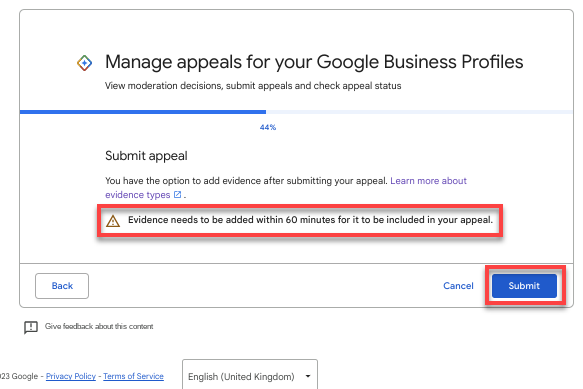
 

This is where you want to start a timer for 60 minutes.

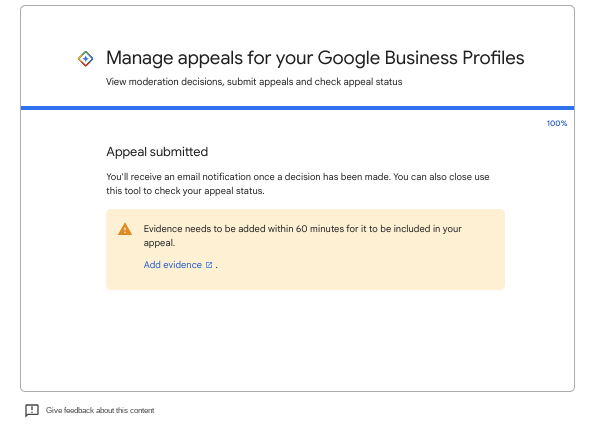
It’s very important that you click on the very subtle Add Evidence link on this screen to open the form so you can upload your evidence documents.

If you choose not to submit any evidence, the chances of your Google Business Profile getting reinstated are slim.

Remember, you have one chance to upload the evidence, so do not miss this step.
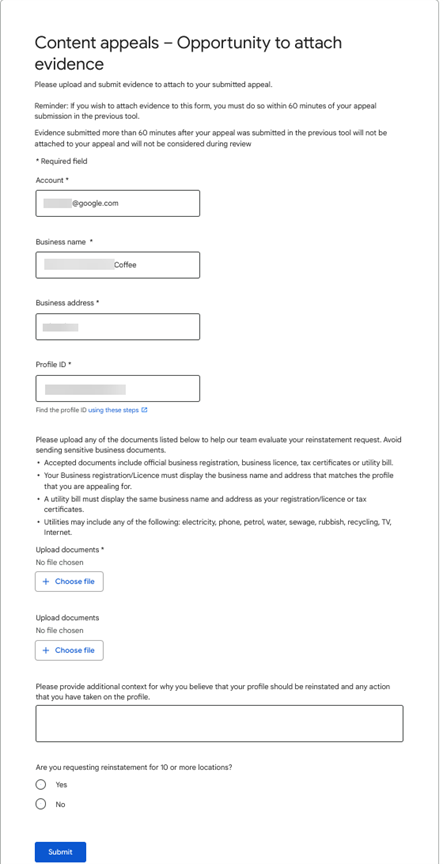
When the Evidence Form opens up, it’s pre-populated with your email address, business name, address, and Google Business Profile ID.

There are options to upload two files, but you can upload zipped files. So, if you have more than two files to upload, zip up those files and upload the zipped file. (The more evidence you can provide Google, the better!)

There is also a text box where you should provide a narrative as to why your profile should be reinstated, what you changed to fix your Business Profile to get it in compliance with GBP Guidelines, and any other information that would be helpful for Google to know.

Keep everything about the facts.

You are allowed 1,000 characters in this space, so use your words carefully.

Once you have uploaded your documents and filled out the rest of the form, click the Submit button.
After you submit the evidence, you will be sent back to the Appeals tool, where your Details/Status should be changed to Submitted.
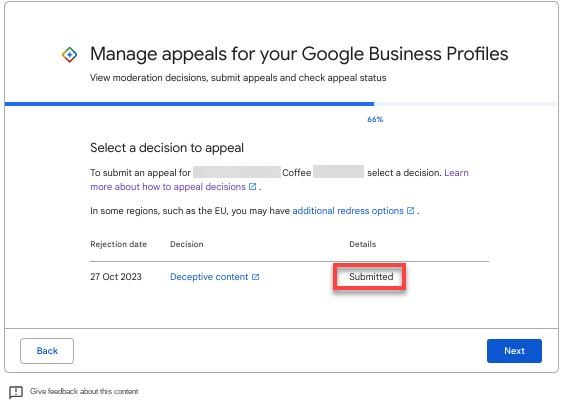
The Google Support team will need several days to manually review the evidence you have submitted and to check your Business Profile to ensure your GBP listing complies with guidelines.

You can check the Appeals tool to see if the Details/Status has changed to either of the following:

  • Approved.
  • Not Approved.

Once Google has reviewed your evidence and GBP listing, you will receive one of two emails.

If your evidence proves that your business is legitimate and your Google Business Profile follows Google’s Guidelines, you will receive an email letting you know that your appeal was approved.
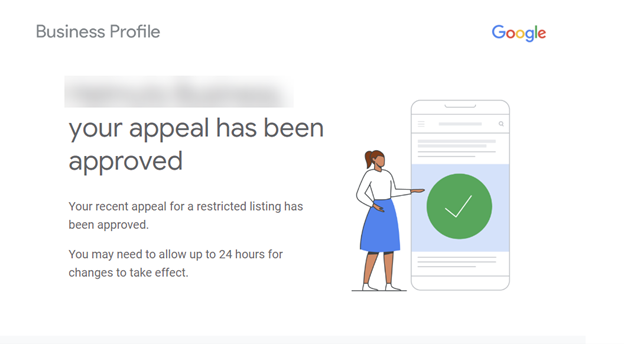
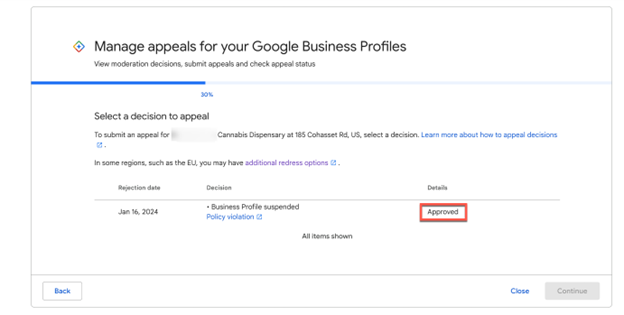
                                                                         The Appeals tool will show that your listing appeal was Approved.
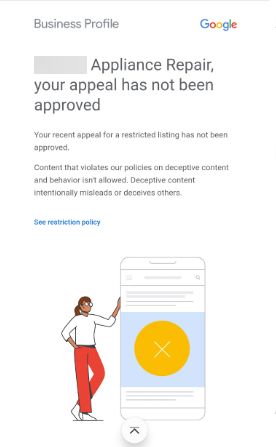
But if your GBP listing is still in violation of guidelines and/or your evidence does not satisfy Google’s requirements, you will receive an email denying your appeal.
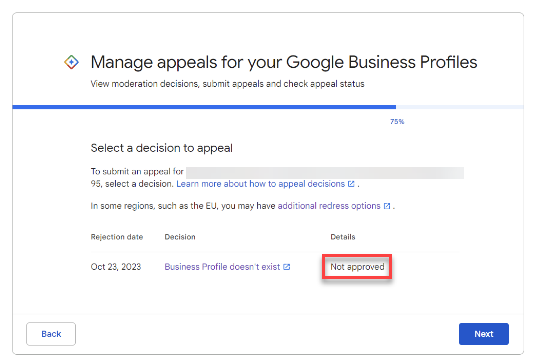
                                                               The Details in the Appeals tool will show that your appeal was Not Approved.
If your appeal is denied, you may have the option to have Google re-evaluate your appeal decision. However, we do not have details yet on how this process works.

Google Business Profile: A Complete Guide for Local SEO

Discover the latest Google Business Profile changes, update features, and keep your profile engaging for optimal visibility and impact.

One of the best local SEO strategies that any eligible local business can use to rank higher on Google and get local clients is to claim and optimize their Google Business Profile.

However, claiming your Google Business Profile (GBP) is just the first step – you must optimize, frequently check, and update your GBP with new information for potential customers.

Also, many businesses don’t realize that Google (and almost any user) can make changes to their GBP – like changing your address, updating your business hours, uploading photos, leaving reviews, and more.

Ultimately, a Google Business Profile is really a community profile – it’s not just yours (the merchant’s).

Virtually anyone online can contribute to your Google Business Profile, and Google encourages user-generated content (UGC), like reviews, Q&As, photos, videos, and more.

So it’s important that you regularly check your Google Business Profile to make sure that no incorrect changes were made to your profile.

Always Follow Google’s Guidelines

When you have a GBP, you are playing on Google’s playground.

That means you must follow Google’s Business Profile’s guidelines – otherwise, your business profile can get suspended. And keep in mind that not all local businesses qualify for a GBP.

I recommend that you check the guidelines at least once every three to four months to make sure there were no changes to the guidelines that may impact your Business Profile.

Ignorance is not an excuse; it’s up to you to know Google’s rules.

If you violate those rules, your GBP will likely get suspended, and you will have to appeal that suspension. (And that’s a very serious thing.)

So it’s better to be informed of the rules than be unfamiliar with them.

How To Optimize Your Google Business Profile

Let’s talk about just a few of the things you can do to optimize your Google Business Profile.

First, you can edit your main company information by clicking on Edit Profile.
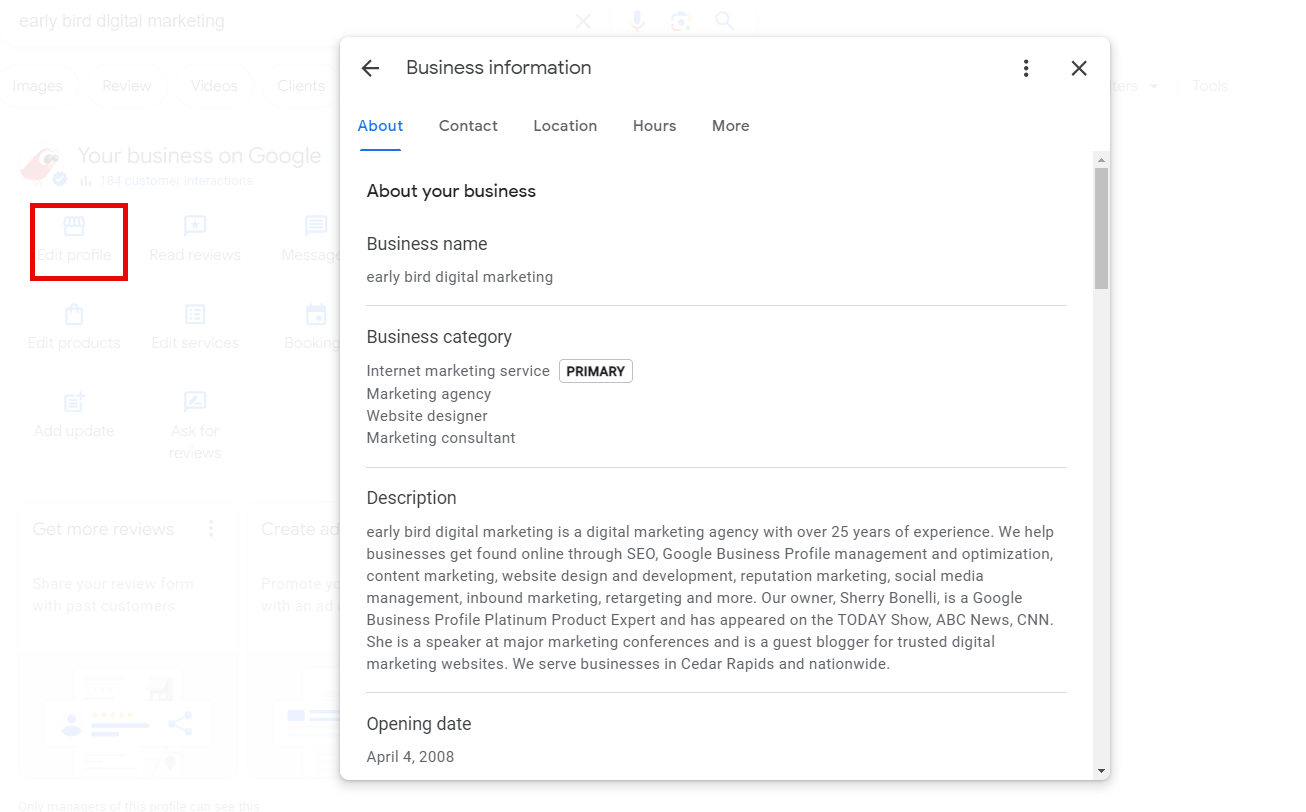
You can add or change information about your business, like your category, business description, opening date, hours, and more.

It’s important that this section follows Google’s guidelines – especially the company’s name and address guidelines.

If you have a storefront location that customers come to, you are allowed to show your address.

If you go out to your customers and service your customers at their location, you must toggle off your address so it’s hidden and not displayed on your GBP listing.

For your business hours, if you’re a storefront, your hours should be the hours when your employees are staffed at the location to meet with customers – not the hours you answer your phone.

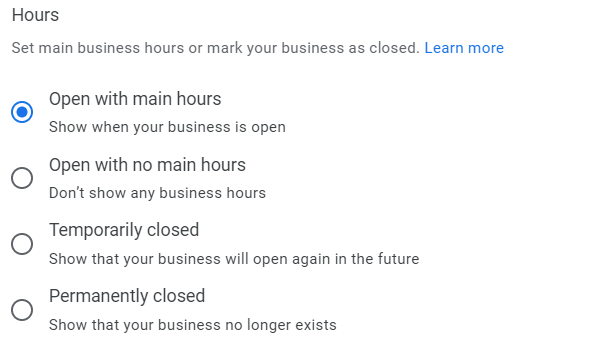
You can also choose to:

  • Open with main hours.
  • Open with no main hours.
  • Temporarily Closed (Show that your business will open again in the future).
  • Permanently Closed (Show your business no longer exists).
You even have the option to add special hours for when you will be closed or have varied hours for holidays. It’s important that you set these hours at least three days before the holiday to give Google time to “approve” the holiday hours.
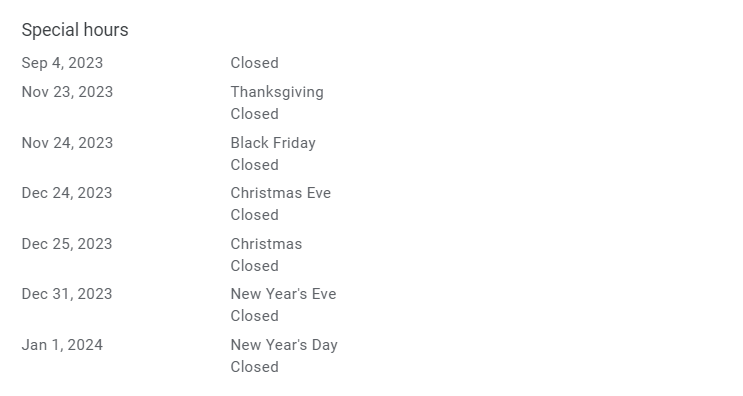
You even have the option to add special hours for when you will be closed or have varied hours for holidays. It’s important that you set these hours at least three days before the holiday to give Google time to “approve” the holiday hours.


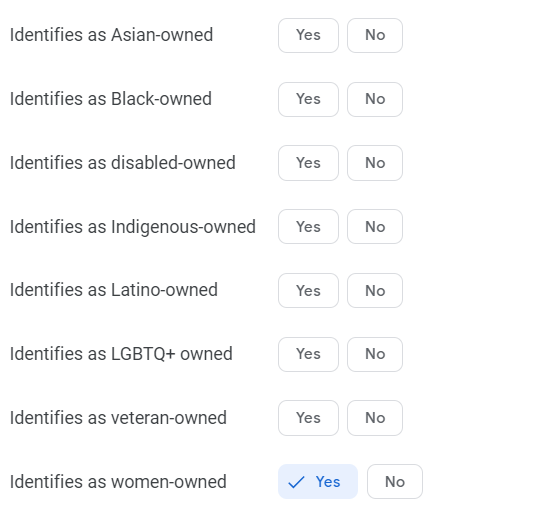
Also, be sure to click the More section to see attributes that may describe specific attributes about your business. These may show up as justifications in search results that can help you stand out to people who are searching.
 

Read Reviews

Choose Read Reviews to see new reviews or reviews that have been left on your GBP listing.

.
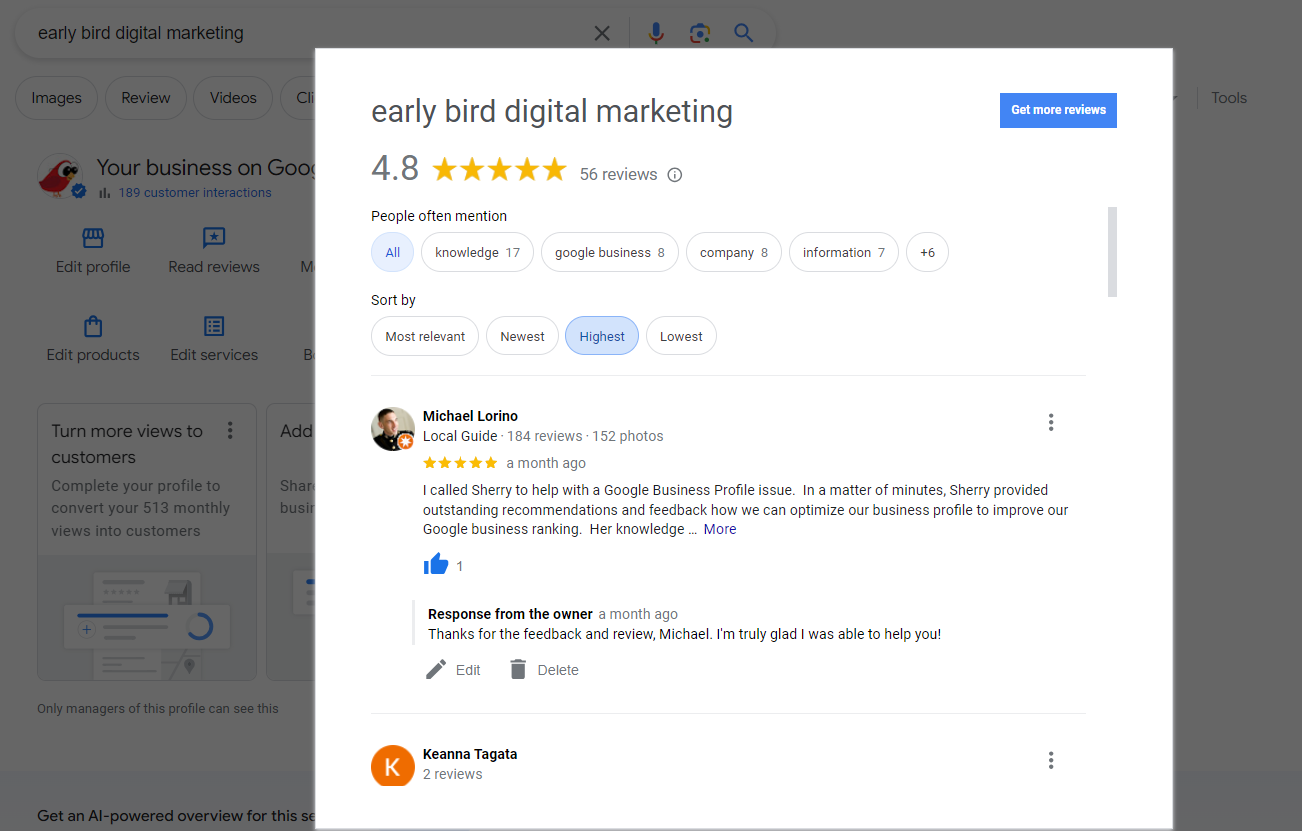
Getting reviews is important to rankings and building confidence with new and potential customers. When you get new reviews – good or bad – it’s important to reply to those reviews as soon as you can.

You’ll receive an email from Google letting you know that you’ve received a new review. You will also know you have a new review because you will see a red dot in the merchant panel and an alert in the “cards.”
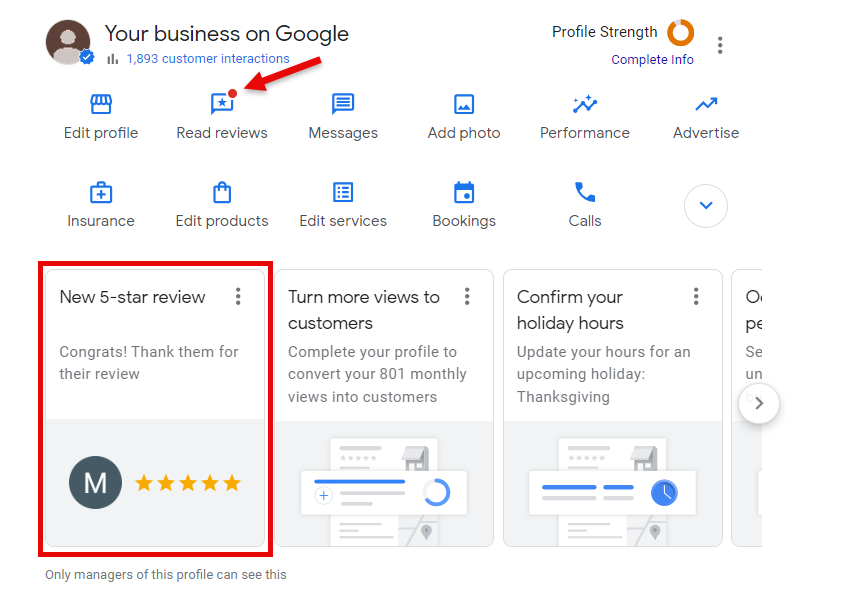
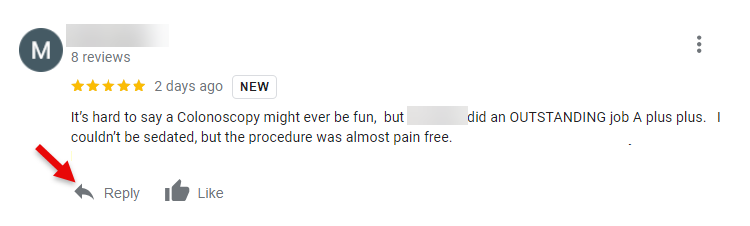
To reply to the review, simply click reply, and you’ll be able to respond to the reviewer.

They’ll receive a notification of your response and anyone that sees the review will also see your reply as well – so make sure you’re always courteous and polite.
 

Messages

In an age when people want a quick response, turning on the messages/chat feature may be a good idea for you. You’ll be able to quickly communicate with potential customers interested in speaking with you.

To turn chat on, click on the Messages option and click the Turn On button.
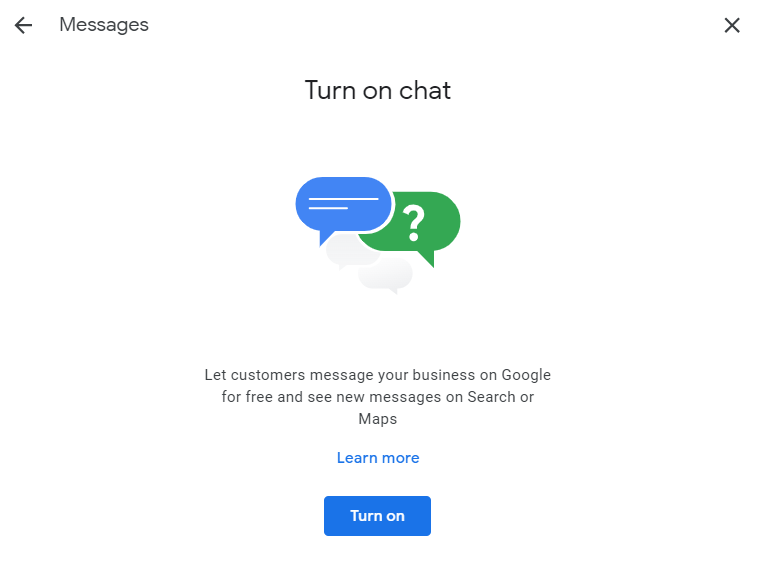
You’ll then see the messages dashboard. Here, you can change the settings to Available or Away, as well as read and reply to messages you receive.Click on the three-dot menu to see the more advanced message settings.
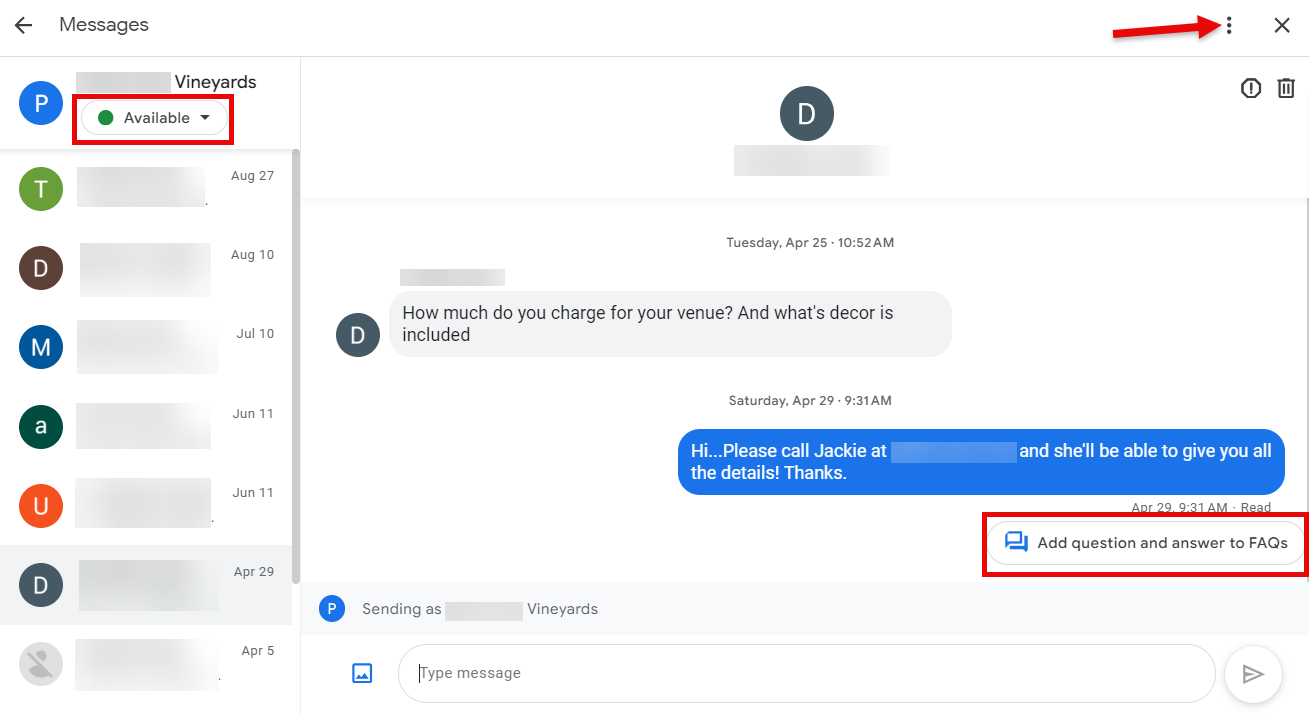
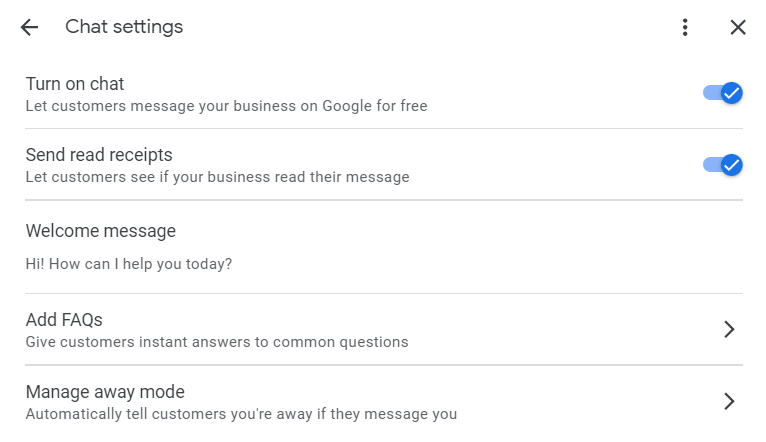
In the advanced settings, you can turn chat on and off as well as turn on and off the read receipts. You should also create a welcome message people will see when they send you a message.

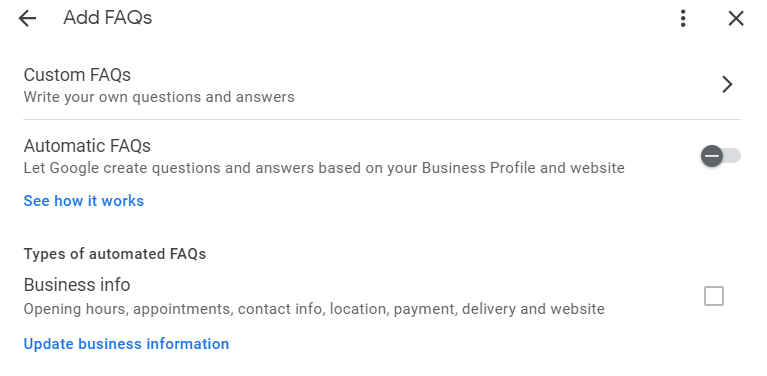
You can also set up custom or automatic FAQs.

These are commonly asked questions that people can see and choose from. Automatic FAQs are automatically created by Google based on your GBP and pertain to the following:

  • Business hours.
  • Appointments.
  • Contact info.
  • Delivery info.
  • Location or address.
  • Accepted forms of payment.
  • Your website URL.

So make sure the information in your GBP listing is accurate.
Custom FAQs are specific questions and answers that you write.
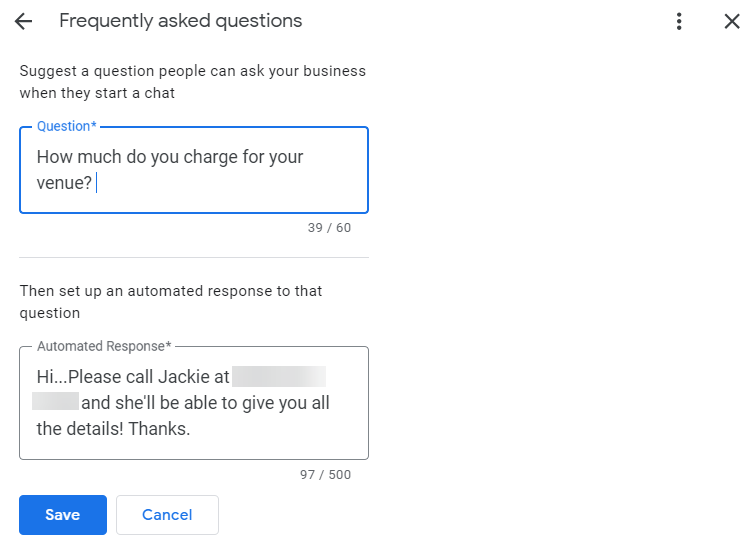
Anyone who’s a manager or owner on your GBP listing will be notified when someone has left a message/chat for you. So, you may want to set up guidelines for how or who is going to respond to messages.

Also, be sure to respond to messages within 24 hours. Google can take away your message privileges if you take longer than 24 hours to respond.

Tip: If you receive a spam message, you can flag it as a spam message, and that user will be blocked.

Add Photos

Local searchers love to see pictures. Photos are also a great way to get engagement from people who see your GBP – and Google likes engagement.

When you upload real pictures of your company – like your building, signage, products, services, team members, activities that your company does (like volunteer work), etc. – you are humanizing your brand.

These types of pictures help connect searchers with your company. And you can upload photos directly to your Google Business Profile!

Click on Add Photo, and you can choose whether you want to upload a photo, your company logo, or a cover photo:
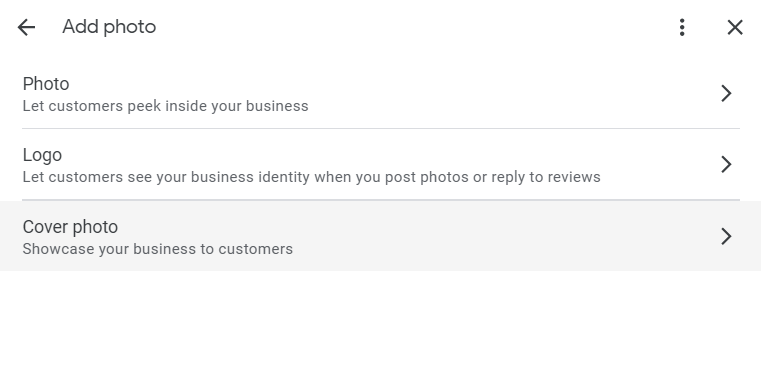
When you choose Photo, you can upload a photo or 30-second video by either dragging it from your computer to the section designated or clicking the blue ‘Select photos or videos’ option to choose the file from your computer:
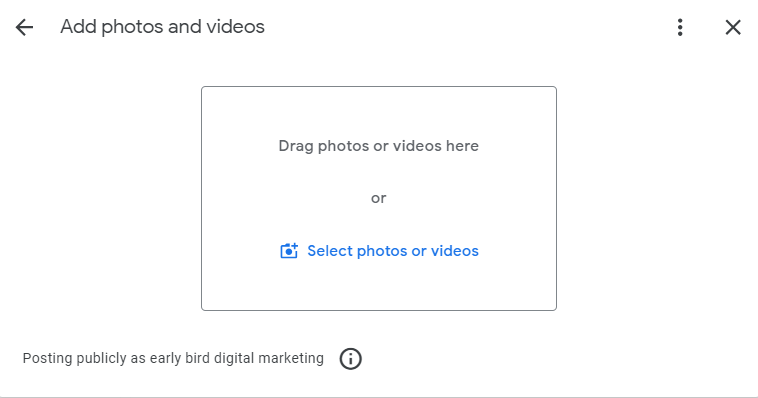
Adding a logo or a cover image works virtually the same. One thing to keep in mind about the cover image is that you can select a cover image, but ultimately, Google decides what cover image it will display on your GBP.

Tip: Do not upload stock photos or marketing material images to your photos. Those are not the type of pictures Google wants uploaded to the photos section on your GBP listing.


Edit Products

If you sell physical products at your store or business, adding products to your Google Business Profile is a great way to show off what you are selling! (Remember, online-only businesses are NOT allowed to claim GBPs.)
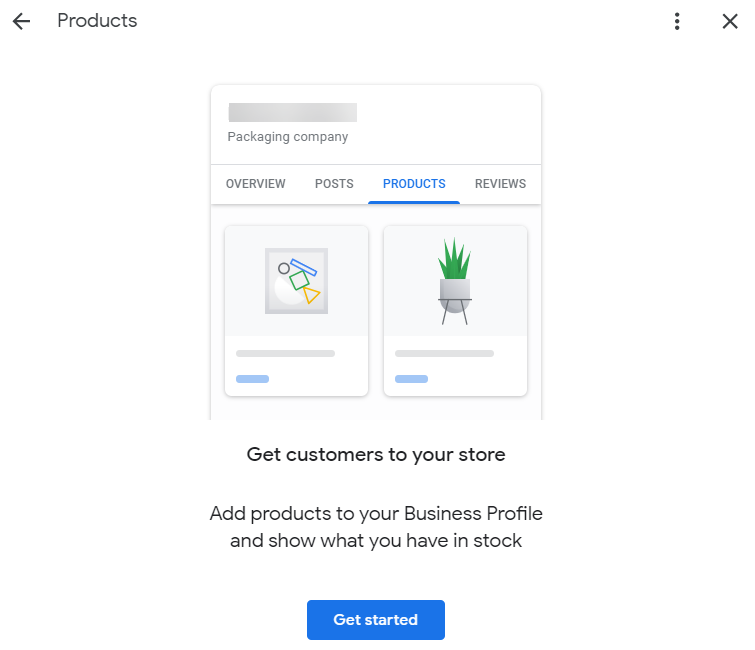
It’s easy to list products! Fill in the simple questions:

  • Product Name.
  • Category – If you don’t have a category already set up, you can create one.
  • Price.
  • Product Description.
  • Product landing page URL. (Optional)
  • Photo.

Once you’ve entered all the information, just click Publish to make the product live on your Google Business Profile Knowledge Panel.
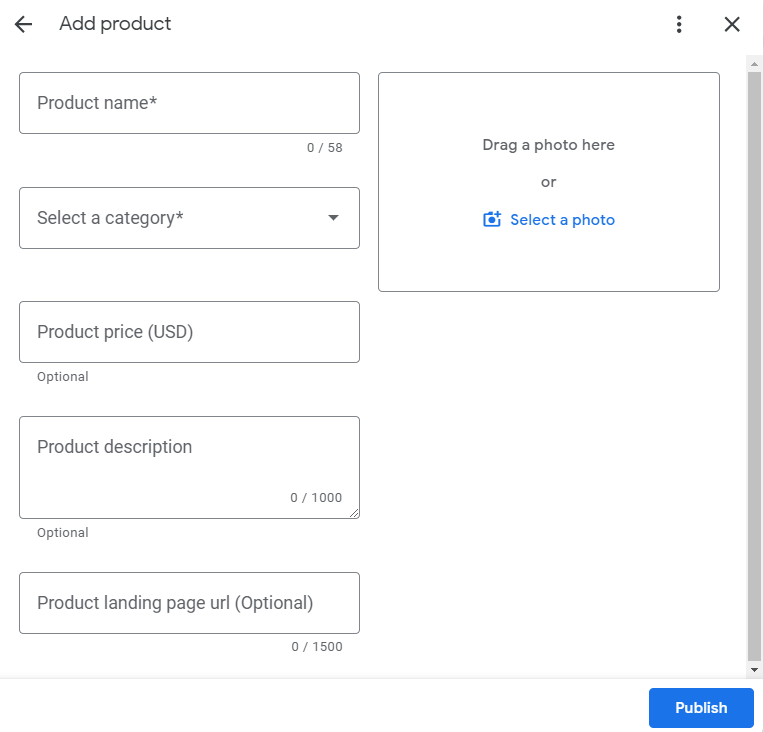
Note: What you enter in Products must actually be products for sale, not services that you offer.


Edit Services

Edit Services works remarkably like Edit Products – but it’s catered to Service Area Businesses (SABs) (like landscapers, plumbers, handymen, roofers, locksmiths, etc.) or companies that offer services to customers or clients (like lawyers, accountants, personal trainers, etc.)

Adding services is super easy. Click on Edit Services, and you’ll see your primary category.

You may also see a list of categories that Google has pre-selected for you to choose from. If any of those pre-selected categories are applicable, just click the + sign and save.
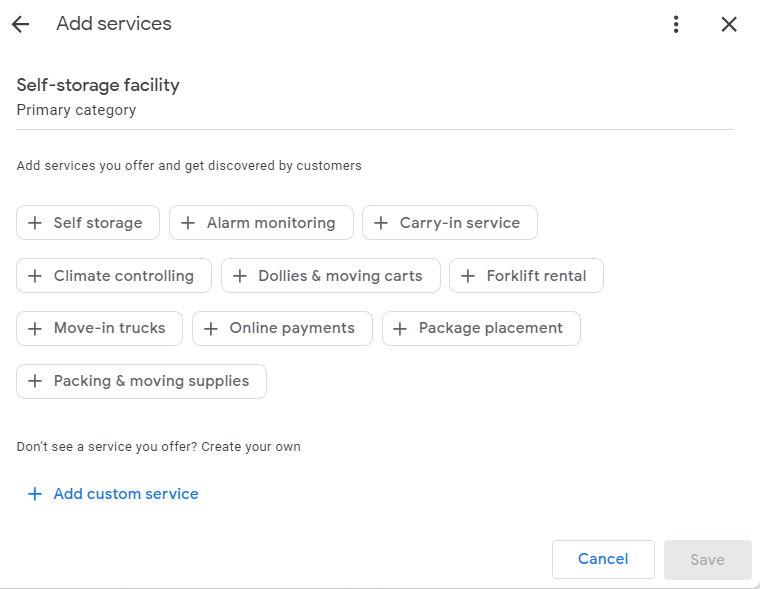
You can also create custom service categories by clicking on the + Add custom service link.

Q&A

Q&A is a great way for potential customers to ask questions about your business, products, or services. Be sure to answer questions as soon as you can.

It’s also important to note that anybody can answer questions that are posted on your GBP – so make sure that you are the one who answers them!
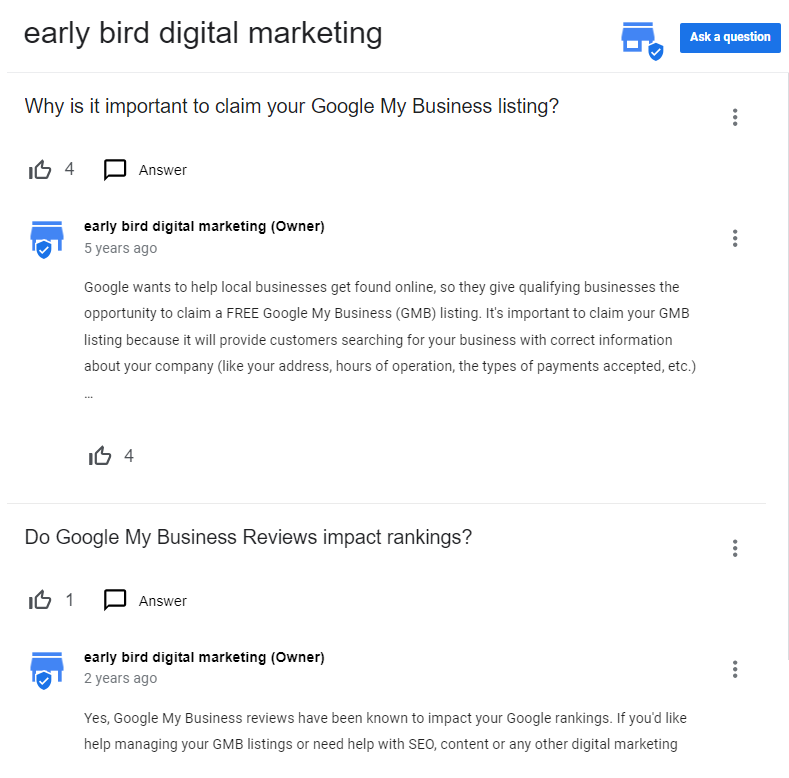
You can also pre-populate your Q&As by creating questions and answering the questions yourself!

Add Update/Posts

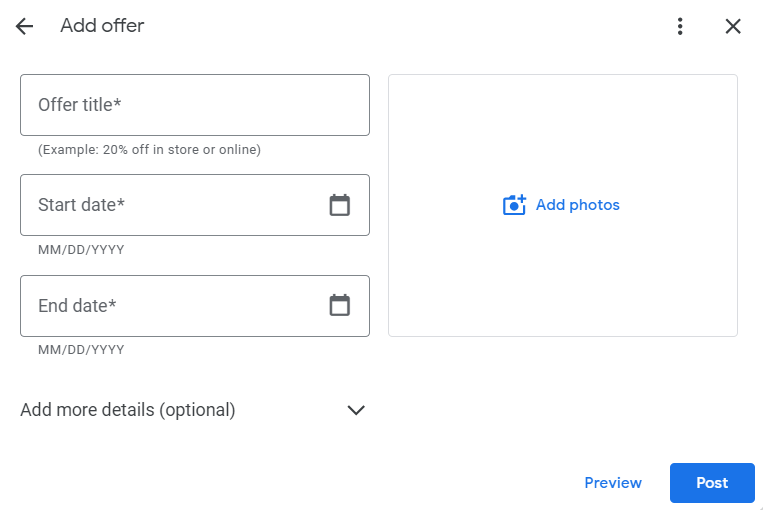
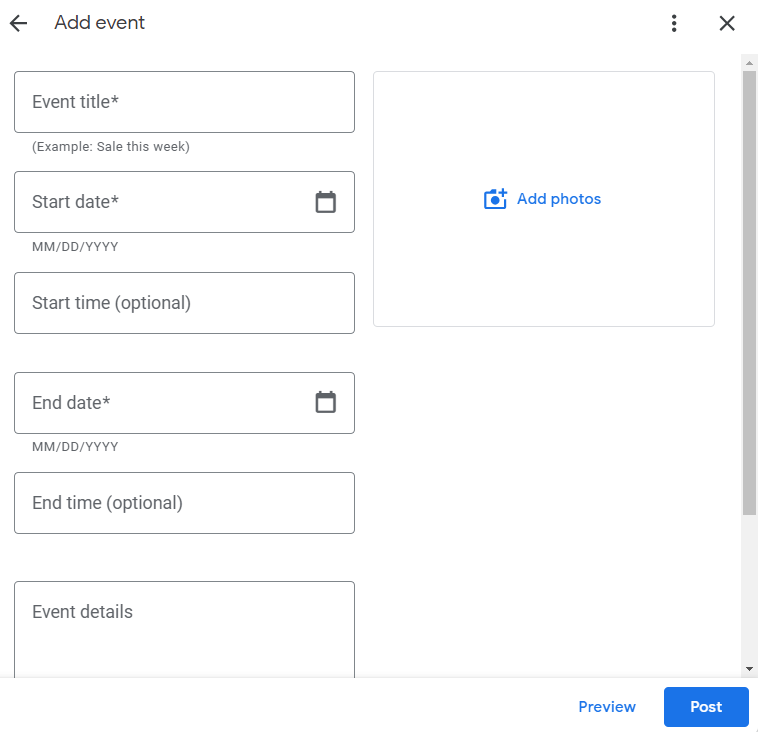
You can let people know about what’s going on at your business through updates (also known as posts). There are three types of posts: Update, offer, or event.
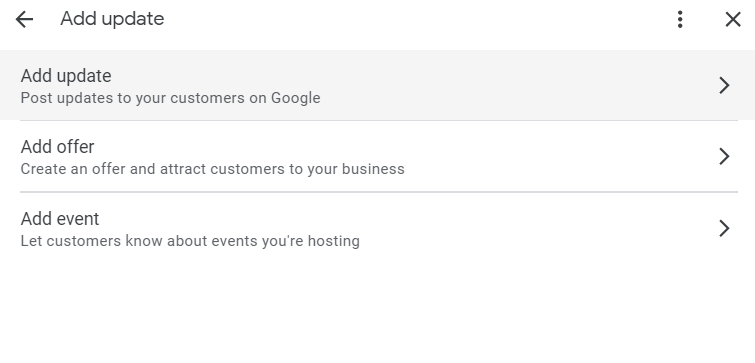
Just select what type of update you want, and a dialog will open.

On the Update post, you can add up to 10 photos to your post as well as a description. Always be sure to add a call to action!
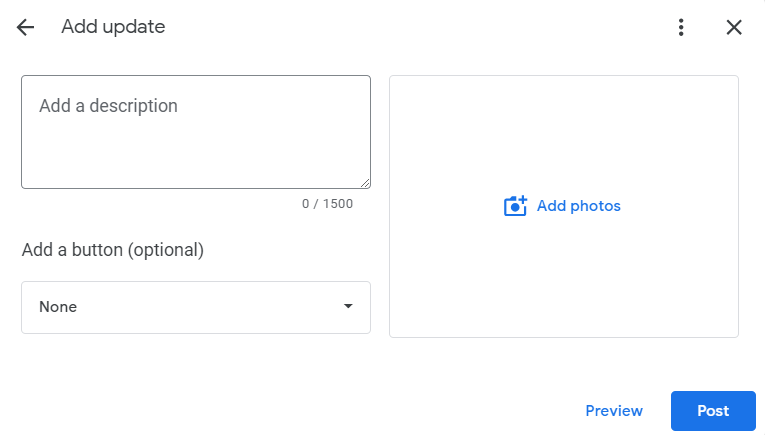
Offer posts are great if you’re having a sale or some type of special offer at your business. You can even add a link to your website where people can buy or redeem the offer when you click on Add more details!
An Event post is perfect for realtors with open houses or for businesses that host events at their business.
Ask for Reviews

Reviews play an important role in rankings but also in building trust with potential clients and customers.

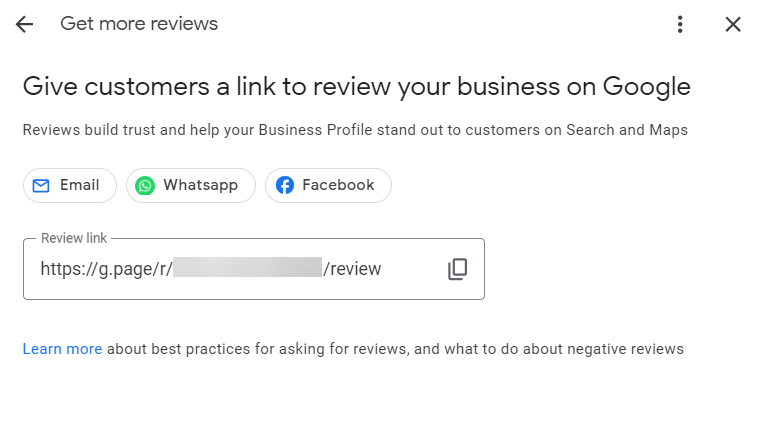
Google makes it super easy to get reviews by giving you a shortened direct link that you can provide your customers so they can easily leave you a review on your GBP.

Simply click on Ask for Reviews, and you can copy the link and give it to your customers and politely ask them to leave you a review.

When they click on the link, they’ll be taken directly to your GBP listing to leave a review. What could be easier?
 

Google Is Always Making Changes To GBP

If you pay attention, you’ll notice that Google is always making changes to Google Business Profile.

Often, these are subtle changes – and sometimes, they’re bigger changes (like adding new attributes or features).

That’s why it’s so important to frequently check your GBP listing for new features or updates to your profile that may not be correct, and to keep your profile engaging for people who view your Business Profile/Knowledge Panel.

Keep your Google Business Profile optimized and up-to-date starting today!

A Guide to Local SEO

Customers are searching for the best products and services near them – and they want answers… fast.

Will your business show up at the exact time when local customers are looking? Will they pick you out of all the local businesses that offer the same products and services?

Search Engine Journal’s ebook, A Guide to Local SEO, tackles what you need to know about optimizing for local search.

Local search engine optimization requires a strategic and targeted approach that is distinct from general SEO.

Brick-and-mortar businesses wanting to win against competitors should make sure all the local signals across Google’s local search landscape are consistent and correct.

We created this comprehensive guide to help local SEO professionals gain a better understanding of today’s local search landscape.

Read A Guide to Local SEO to learn:

  • Top local ranking signals you need to know and why.
  • How to build a winning local SEO strategy.
  • Tips for analyzing local search competition.
  • Why and how NAP information and user experience affect local SEO.
  • How and where to find the best local link building opportunities.
  • Why reviews and star ratings matter – and how to use them.
  • How to completely optimize your GBP listing.
  • The attributes you need for an effective GBP listing.
  • Local SEO and listing management tools that save you time and improve performance.
  • And a lot more.

If you want to have a solid foundation on local search engine optimization, make sure to read SEJ’s A Guide to Local SEO.

GMB Suspension

Google Suspended Account

Suspended Google My Business

Google My Business Suspended

Fix Suspended Business Profile

Google My Business Suspension

Suspended GMB

Google Account Suspended

Google My Business Suspended

Fix Suspended Business Profiles

Google My Business Suspended

Suspended Google My Business

GMB Reinstatement

GMB Suspended

Google Account Suspend

Google Business Suspended

Google Reinstatement Form

Suspended Google Account

Google my business suspended

Google my business suspension

Google my business suspended 2024

Google my business suspended for suspicious activity

Google my business suspended account

Google my business suspended help

Google my business suspended reddit

Google my business suspension

GMB suspended

How to regain access to google my business

How to regain access to google my business suspended

Google my business suspended for suspicious activity

Google my business suspended due to quality issues

Google my business suspended for suspicious activity

How to fix suspended google my business

Google my business suspended due to quality issues

How to regain access to google my business

How to regain access to google my business suspended

Google my business suspended for suspicious activity

Google my business suspended due to quality issues

Google my business suspended for suspicious activity

How to fix suspended google my business

Google my business suspended due to quality issues

Google my business suspended for quality issues

Google my business suspended meaning

Google my business suspended how to fix

Google business suspended due to suspicious activity

Google my business suspended due to quality issues

Google business profile suspended

Google business suspended

GMB Suspension

Google Suspended Account

Suspended Google My Business

Google My Business Suspended

Fix Suspended Business Profile

Google My Business Suspension

Suspended GMB

Google Account Suspended

Google My Business Suspended

Fix Suspended Business Profiles

Google My Business Suspended

Suspended Google My Business

GMB Reinstatement

GMB Suspended

Google Account Suspend

Google Business Suspended

Google Reinstatement Form

Suspended Google Account

Google my business suspended

Google my business suspension

Google my business suspended 2024

Google my business suspended for suspicious activity

Google my business suspended account

Google my business suspended help

Google my business suspended reddit

Google my business suspension

GMB suspended

How to regain access to google my business

How to regain access to google my business suspended

Google my business suspended for suspicious activity

Google my business suspended due to quality issues

Google my business suspended for suspicious activity

How to fix suspended google my business

Google my business suspended due to quality issues

How to regain access to google my business

How to regain access to google my business suspended

Google my business suspended for suspicious activity

Google my business suspended due to quality issues

Google my business suspended for suspicious activity

How to fix suspended google my business

Google my business suspended due to quality issues

Google my business suspended for quality issues

Google my business suspended meaning

Google my business suspended how to fix

Google business suspended due to suspicious activity

Google my business suspended due to quality issues

Google business profile suspended

Google business suspended

GMB Suspension

Google Suspended Account

Suspended Google My Business

Google My Business Suspended

Fix Suspended Business Profile

Google My Business Suspension

Suspended GMB

Google Account Suspended

Google My Business Suspended

Fix Suspended Business Profiles

Google My Business Suspended

Suspended Google My Business

GMB Reinstatement

GMB Suspended

Google Account Suspend

Google Business Suspended

Google Reinstatement Form

Suspended Google Account

Google my business suspended

Google my business suspension

Google my business suspended 2024

Google my business suspended for suspicious activity

Google my business suspended account

Google my business suspended help

Google my business suspended reddit

Google my business suspension

GMB suspended

How to regain access to google my business

How to regain access to google my business suspended

Google my business suspended for suspicious activity

Google my business suspended due to quality issues

Google my business suspended for suspicious activity

How to fix suspended google my business

Google my business suspended due to quality issues

How to regain access to google my business

How to regain access to google my business suspended

Google my business suspended for suspicious activity

Google my business suspended due to quality issues

Google my business suspended for suspicious activity

How to fix suspended google my business

Google my business suspended due to quality issues

Google my business suspended for quality issues

Google my business suspended meaning

Google my business suspended how to fix

Google business suspended due to suspicious activity

Google my business suspended due to quality issues

Google business profile suspended

Google business suspended

Scroll to Top